

省流:Table映射List,Dictionary,Class是值拷贝,映射Interface是引用
Table映射List和Dictionary
testList = {1, 2, 3, 4, 5}
testList2 = {"123", true, 3, "d", 1.2}

testDic = {
    [1] = 1,
    [2] = 2,
    [3] = 3,
    [4] = 4
}
testDic2 = {
    ["name"] = "张三",
    [1] = 18,
    [false] = true,
    ["123"] = false
}
用List和Dicitionary存储lua中的Table是值拷贝,修改List和Dictionary中的元素,不会改变lua中的内容
using System.Collections.Generic;
using UnityEngine;
public class Lesson6_CallListDic : MonoBehaviour
{
    // Start is called before the first frame update
    void Start()
    {
        LuaMgr.GetInstance().Init();
        LuaMgr.GetInstance().DoLuaFile("Main");
        var global = LuaMgr.GetInstance().Global;

        //获取确定类型List
        List<int> list = global.Get<List<int>>("testList");
        Debug.Log("------testList------");
        foreach (var item in list)
            Debug.Log(item);
        //值拷贝,修改不会改变lua中的内容
        list[0] = 100;

        //获取不确定类型List
        List<object>  list2 = global.Get<List<object>>("testList2");
        Debug.Log("------testList2------");
        foreach (var item in list2)
            Debug.Log(item);

        //获取确定类型字典
        Dictionary<string, int> dic = global.Get<Dictionary<string, int>>("testDic");
        Debug.Log("------testDic------");
        foreach (var item in dic)
            Debug.Log(item.Key + ":" + item.Value);
        //是值拷贝,lua中的内容不会被修改
        dic["1"] = 192391293;
        //获取不确定类型字典
        Dictionary<object, object> dic2 = global.Get<Dictionary<object, object>>("testDic2");
        Debug.Log("------testDict------");
        foreach (var item in dic2)
            Debug.Log(item.Key + ":" + item.Value);
    }
}
Tabel映射Class
testClass = {
    testInt = 2,
    testBool = true,
    testFloat = 1.23,
    testString = "Hello, Lua!",
    testFunc = function()
        print("这是一个类中的函数")
    end ,
    testInClass = {
        testInInt = 5
    }
}
using System;
using UnityEngine;
public class CallLuaClass
{
    //成员名字要和lua一样
    //成员需要是公共的
    //成员的数量如不同,会被忽略
    public int testInt;
    public string testString;
    public float testFloat;
    public bool testBool;
    public Action testFunc;
    //类嵌套
    public CallLuaInClass testInClass;

    public int i;
    public void Test()
    {
        Debug.Log("没用的");
    }
}
public class CallLuaInClass
{
    public int testInInt;
}
public class Lesson7_CallLuaClass : MonoBehaviour
{
    // Start is called before the first frame update
    void Start()
    {
        LuaMgr.GetInstance().Init();
        LuaMgr.GetInstance().DoLuaFile("Main");

        var global = LuaMgr.GetInstance().Global;
        CallLuaClass obj = global.Get<CallLuaClass>("testClass");
        Debug.Log("testInt:"+obj.testInt);
        Debug.Log("testString:"+obj.testString);
        Debug.Log("testFloat:"+obj.testFloat);
        Debug.Log("testBool:"+obj.testBool);
        Debug.Log("嵌套类:"+obj.testInClass.testInInt);
        obj.testFunc();
    }
}
Table映射Interface
与映射Class不同,Interface不允许成员变量,需要用属性来接收,且需要加[CSharpCallLua]特性并Generate Code
嵌套与Class相同
且映射interface是引用拷贝,改变interface中的值,lua中的内容也会被修改!
testInterface = {
    testInt = 2,
    testBool = true,
    testFloat = 1.23,
    testString = "Hello, Lua!",
    testFunc = function()
        print("这是一个接口中的函数")
    end
}
using System;
using UnityEngine;
using XLua;

//接口不允许有成员变量,需要用属性来接收
[CSharpCallLua]
public interface ILuaInterface
{
    int testInt { get; set; }
    float testFloat { get; set; }
    bool testBool { get; set; }
    string testString { get; set; }
    Action testFunc { get; set; }
}
public class Lesson8_CallInterface : MonoBehaviour
{
    void Start()
    {
        LuaMgr.GetInstance().Init();
        LuaMgr.GetInstance().DoLuaFile("Main");

        var global = LuaMgr.GetInstance().Global;
        ILuaInterface obj = global.Get<ILuaInterface>("testInterface");
        Debug.Log("testInt:"+obj.testInt);
        Debug.Log("testFloat:"+obj.testFloat);
        Debug.Log("testBool:"+obj.testBool);
        Debug.Log("testString:"+obj.testString);
        obj.testFunc();

        //映射接口是引用!修改成员属性的之后,lua中的内容也会被修改
        obj.testInt = 114514;
        ILuaInterface obj2 =  global.Get<ILuaInterface>("testInterface");
        Debug.Log("testInt:"+obj2.testInt);
    }
}
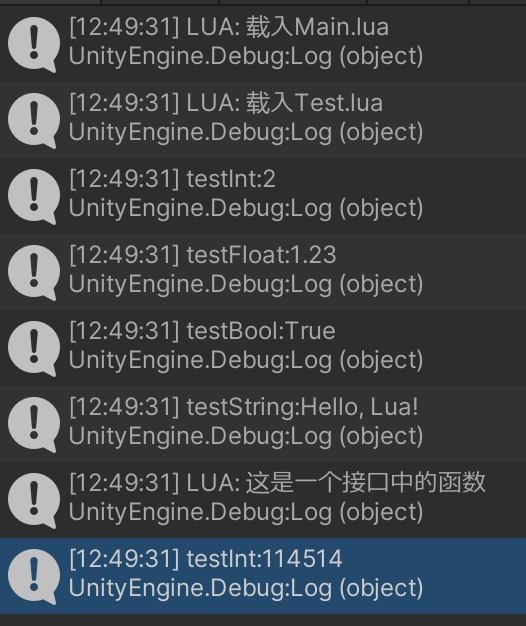
Table映射到LuaTable
不建议使用,效率低,且是直接引用。需要手动Dispose()垃圾回收,容易遗忘导致内存泄漏
using UnityEngine;
using XLua;
public class Lesson9_CallLuaTable : MonoBehaviour
{
    void Start()
    {
        LuaMgr.GetInstance().Init();
        LuaMgr.GetInstance().DoLuaFile("Main");

        var global = LuaMgr.GetInstance().Global;
        //不建议使用,效率低,且是直接引用
        LuaTable table = global.Get<LuaTable>("testClass");
        Debug.Log(table.Get<int>("testInt"));
        Debug.Log(table.Get<string>("testString"));
        Debug.Log(table.Get<float>("testFloat"));
        Debug.Log(table.Get<bool>("testBool"));
        LuaFunction func = table.Get<LuaFunction>("testFunc");
        func.Call();
        //可以直接修改lua中的值
        table.Set("testInt", 114514);
        Debug.Log(table.Get<int>("testInt"));
        //清理内存
        table.Dispose();
    }
}
评论(0)
暂无评论